Google Wave's Works

Here's how it works: In Google Wave you create a wave and add people to it. Everyone on your wave can use richly formatted text, photos, gadgets, and even feeds from other sources on the web. They can insert a reply or edit the wave directly. It's concurrent rich-text editing, where you see on your screen nearly instantly what your fellow collaborators are typing in your wave. That means Google Wave is just as well suited for quick messages as for persistent content — it allows for both collaboration and communication. You can also use "playback" to rewind the wave and see how it evolved.As with Android, Google Chrome, and many other Google efforts, we plan to make the code open source as a way to encourage the developer community to get involved. Google Wave is very open and extensible, and we're inviting developers to add all kinds of cool stuff before our public launch. Google Wave has three layers: the product, the platform, and the protocol:
  • The Google Wave product (available as a developer preview) is the web application people will use to access and edit waves. It's an HTML 5 app, built on Google Web Toolkit. It includes a rich text editor and other functions like desktop drag-and-drop (which, for example, lets you drag a set of photos right into a wave).
  • Google Wave can also be considered a platform with a rich set of open APIs that allow developers to embed waves in other web services, and to build new extensions that work inside waves.
  • The Google Wave protocol is the underlying format for storing and the means of sharing waves, and includes the "live" concurrency control, which allows edits to be reflected instantly across users and services. The protocol is designed for open federation, such that anyone's Wave services can interoperate with each other and with the Google Wave service. To encourage adoption of the protocol, Google intend to open source the code behind Google Wave.

10 Old Technologies That Are Now the Next Big Thing

The time is now for these new technologies that are in fact old technologies.
Quick, name some of the hot new technologies that are now on stage to lead the new technology revolution. You'll probably name some transportation tech, computer tech and green tech. But how many of those are really new? On second thought, you will find that some of the newest tech is really some of the oldest tech. Technology in and of itself isn't always sufficient to change the world. You need a congruence of smarter technology, economic impetus, social acceptance and a political climate all ripe for change. Here is my list of 10 new techs that are really old tech, with a quick guess why now is their time. I'd welcome your comments and suggestions for 10 additional items.
1. Electric cars. The automobile industry going through a major change from petroleum-based engines to hybrid systems or, in some cases, all-electric. Now that has to be new, right? Wrong. Let's go back to 1902 and the Phaeton and take a ride. Why did the gasoline engine win in the early 1900s? I'm thinking the mobility, range and distribution network had a lot to do with it. And I'm thinking those three factors will drive the second transition to the all-electric car.
2. Efficient public transportation. Jump on and off, frequent schedules, and the ability to quickly branch out beyond the urban center. Sounds like the early trolley system to me. In the 1920s trolley tracks were U.S. You can still ride the trolleys in Europe. Maybe if you could just skip the wires and use hybrids, those trolleys might return.
3. Touch-screen computers. Would you believe I'm typing this on my 1993 Apple Newton MessagePad? No you wouldn't, and you'd be correct. How about on my Windows-based tablet that Bill Gates predicted in 2001 would now be ubiquitous? Right, not on that either. Connectivity, design format, ease of use and useful applications all conspired to keep the tablet computer firmly in the future. Now that is about to change. Even the great gray lady herself, The New York Times, is figuring the tablet will soon move from the future to your hands.
4. Photovoltaic. Sunlight in, power out. What could be easier? It was first accurately described in 1883. What took so long? Well, you needed a long manufacturing ramp to make those cells competitive with the big power plants, and you needed a lot of money to fund those manufacturing facilities. And you needed a lot of innovation to take the basic idea and get it on a roof. You needed government incentives, a marketing plan and a community of installers. It could all happen starting in 2010.
5. Virtualization. Are you looking to lose a barroom argument? Mention to a long-time IBMer that virtualization is a new technology cooked up in Silicon Valley. Now be prepared to hear about virtualization running along quite nicely on 1960s mainframes, thank you very much. Of course, the difference this time around is that virtualization extends beyond the mainframe and IBM-only realm. But IBM did have all the pieces in place way back then.
6. Cloud computing. Remember how we used to chuckle about those 1940s and 1950s predictions that the world would only need four or five big computers? What a bunch of chuckleheads to think that. Now let's see, if Google keeps growing and Amazon keeps growing, that will leave room for three more big cloud companies. I still credit Salesforce.com's  Marc Benioff for seeing this train leaving the station early, but those cloud predictors from the 1950s may have gotten the forecast correct.
7. Encryption. OK, we are in the wayback machine for the next couple.  Why is it that when the credit card hacker breaks into the banking system, they get the actual user name and card number instead of a bunch of scrambled data? Is it because computer-based encryption was seen as too slow, costly and cumbersome when the financial systems were first built? Was it hubris for those early developers to consider their banking systems unhackable? It certainly wasn't because encryption was a new technology. I'd say on this one it is time to go tell the Spartans, who used encryption.
8. Secure banking. When I bank online, I use a name and password to get to a banking site that shows me a nifty icon to assure me I am on the real banking site and not on some hack site in a former Soviet Republic. That cannot possibly be the summit of secure banking and online transactions. Real online security requires something you have (like a fob that is either hardware- or software-based), something you know and some way to determine who you really are. How old is that idea? Dan Brown could probably write a novel about the Templars' check cashing system.
9. Super insulation. In these green-energy-aware times, it is evident that the best energy conservation technique is to not use the energy in the first place rather than try to get more efficient use out of existing energy resources. You can retrofit your house to waste less energy and use more efficient heating and cooling systems, or you can build a super-efficient system from the start. Time to go on vacation. Maybe those old adobe dwellings have something to teach us after all.
10. Personal, pollution-free transportation. You want to travel a mile or so to the store or the library or school. Or maybe you just want to take a nice trip around the neighborhood. What choices do you have? You could walk around the block. You could put down the top on the convertible and at least feel like you were not so confined. Or you could jump on a vehicle first refined for easy, personal, pollution-free transportation in 1885. That would be a bicycle.
Source: http://www.smartertechnology.com/c/a/Technology-For-Change/10-Old-Technologies-That-Are-Now-the-Next-Big-Thing/
Suscribe my post

Google Launches Dictionary and Translated Web Search

Amid all the hubbub over Google DNS on Thursday, the search giant also released two more helpful tools to help you get a richer search experience and improve your language skills. Google launched its dictionary project, offering a feature-rich resource that goes beyond simple definitions of words; and its new translated Web search makes it easier to find Web pages written in more than 40 languages.

Dictionary


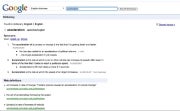
Google dictionary puts a full-service resource right at your fingertips that can be accessed through Google's Dictionary page or through a regular Web search. To access words through regular search, click on the "definitions" link on the top right of your results page next to where it says how many results Google has returned for your query (click to enlarge the screen cap).
Google dictionary isn't just for English. The project contains 27 other languages, including the major Western European languages, Chinese (simplified and traditional), Korean, Arabic, Hebrew, and many more. Notable languages currently missing from the project include Japanese and Persian. Google Dictionary also has an English-to-foreign language component, allowing you to translate single words from English into a foreign language or vice versa. This is similar to what you can do in Google Translate.

Rich Definitions Page

Google's word definitions page is full of useful information including an International Phonetic Alphabet (IPA) pronunciation guide, synonyms, standard definitions, and usage examples. You can also find external links to Princeton University, Wikipedia, and elsewhere to see to further definitions and usages of the word in question; however, it should be noted this collection of aggregated links on Google's dictionary page has been around for some time, according to The Los Angeles Times.
If the word you're searching for is found in another language, Google provides a link to that dictionary as well, and particularly difficult or unusual words include an audio file to let you hear how the word is pronounced. Try searching in English for words such as schadenfreude or Zoroastrianism to see this in action. Some words may also trigger image results; search for winceyette to see an example of this. You can also bookmark particular words for easier access at another time.
From what I can tell, Google's dictionary project has not been merged with the spell check on Google Docs.
TIP: Google's dictionary is very comprehensive, so for all you juveniles out there: Yes, you can find your favorite dirty words and their definitions in Google Dictionary. And no, these words don't have pronunciation sound files.

Translated Search

Google has added a feature to its search options panel that allows you to search in English across Web sites in
other languages. Google has had a similar feature for some time that allows you to automatically translate foreign language Web sites appearing in Google's regular search results. But this newest feature searches only foreign language Web sites.
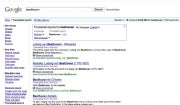
googleTo activate the feature, choose a search term like "Beethoven" and then click on "Show Options" on the top left of the results page. Then click on "Translated Search" at the bottom of the options panel on the left side. (Click on the screen cap for a closer look.)
Once you've got your translated search, a box at the top of the results page tells you what language the results are being translated into and what language the results are being translated from. You have the option to add other languages to expand your search; Google supports 42 choices.
TIP: If you installed the javascript uncovered by Gizmodo that gives you the rumored visual revamp of Google, you won't be able to access translated search or Google Dictionary from the search results page. To get this functionality you either have to delete your Google cookie or use another Web browser. http://www.pcworld.com/article/183717/google_launches_dictionary_and_translated_web_search.html

Suscribe my post

Google Customizes More of Its Search Results

For many of its users, Google offers Web search results that are customized based on their previous search history and clicks. For example, if someone consistently favors a particular sports site, Google will put that site high in the results when they look up sports topics in its search engine.
But there has always been one catch: people had to be signed in to a Google account to see such customization.
On Friday Google said it was extending these personalized search results, and the resulting improvement in ad targeting, to people who are not logged into the service.
The new service, according to a Google blog post, will use an anonymous cookie on a user’s computer to customize search results based on the user’s last 180 days of search activity. A “view customizations” link will appear on the top right of the search results page, and will lead to an explanation of how the results have been tailored and how the feature can be turned off.
“Our goal is to provide relevant search results,” said Nathan Tyler, a Google spokesman. “The benefits that we’ve seen for signed-in users were so great we want to extend those same benefits to everyone.”
But the change is already irking privacy advocates, who say that using Google while not logging in was one way to minimize exposure to its data-collection practices.
“The key point is that Google is now tracking users of search who have specifically chosen not to log in to a Google account,” said Marc Rotenberg, executive director of the Electronic Privacy Information Center in Washington. “They are obliterating one of the few remaining privacy safeguards for Google services.”
In an evaluation of the announcement on the blog Search Engine Land, Danny Sullivan noted that there was no way for searchers or others to view the saved search records on Google, and that Google was giving people the opportunity to permanently opt out of the arrangement.
“All the major search engines have long recorded what you search on. Google’s simply using it to refine your results,” Mr. Sullivan wrote. By BRAD STONE http://bits.blogs.nytimes.com/2009/12/04/google-customizes-more-of-its-search-results/
Suscribe my post